Solo
Your searches, credits, saved properties and routes in one account. Research an area, choose your doors and keep visit notes and follow-up together.
Get started with SoloWork independently with Solo, or give every rep their own login inside one Team workspace. Plan on desktop and open the same work on your phone.
The owner invites workers into the existing company workspace. Each worker has a personal view within that workspace and uses its credits.
Send an invitation from Team management, within the account's seat allowance.
Follow the invitation link and complete account setup using the invited email address.
Find properties, reveal addresses from the shared balance, and create a route or open an assigned route.
Workers do not see other workers' private visit notes. The owner can review activity across the company workspace.
Swipe across the table to compare the worker and owner views.
| Activity | Worker | Team owner |
|---|---|---|
| Search and reveal properties | Search with the shared Team balance | Search with the same Team balance |
| Saved properties | Your own saved/revealed properties and assigned work | Company-wide property view |
| Routes | Build your own routes and use routes assigned to you | Review company routes and assign them to workers |
| Visit notes and follow-up | Record and review your own activity | Review company visit activity |
| Invitations and access | Use your individual login | Invite people and manage their access |
| Credits and billing | Use the shared balance for new reveals | Buy credits and manage workspace billing |
Current seat allowances and activation credits are on Pricing. A property already revealed by the workspace does not cost another reveal credit when a colleague opens it from search.
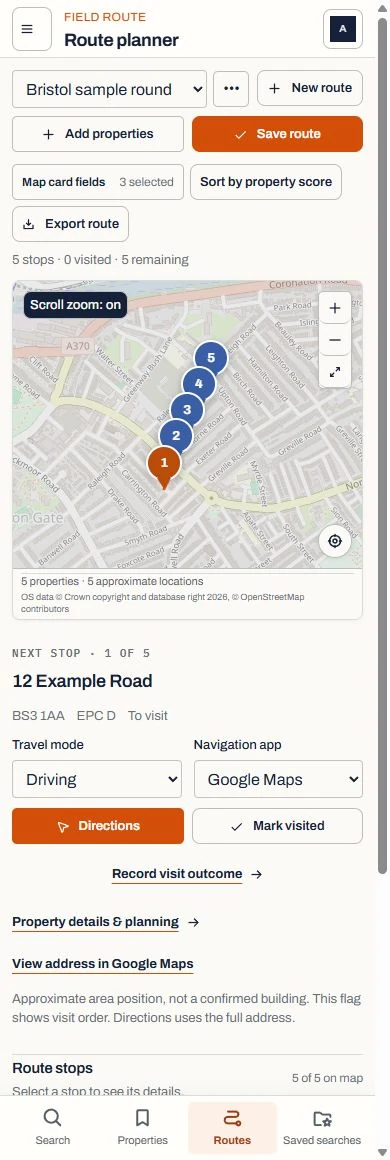
Prepare the route on a larger screen, then sign in on your phone. Open directions to the selected property, record the result and keep the follow-up with the visit.
RetroPilot can be added to your home screen on supported browsers. Live searches need an internet connection.
Explore routes and visitsFind the details on access, payments, invitations and using RetroPilot in the field.